frowse tested: 96% smaller snapshots, but silent wrong clicks
I ran frowse on a 50-product test page. Its snapshot was 96% smaller than agent-browser's, but it silently clicked the wrong item and reported success.

Head of Product at Sprouts.ai
frowse gives a coding agent a short text summary of a web page, then uses a model on your machine to find the button or field you named in plain English. In my test, the page summary an AI reads was about 96% smaller, so each look at a page costs far less. The catch: it sometimes clicked the wrong button and still reported success (it printed ok).
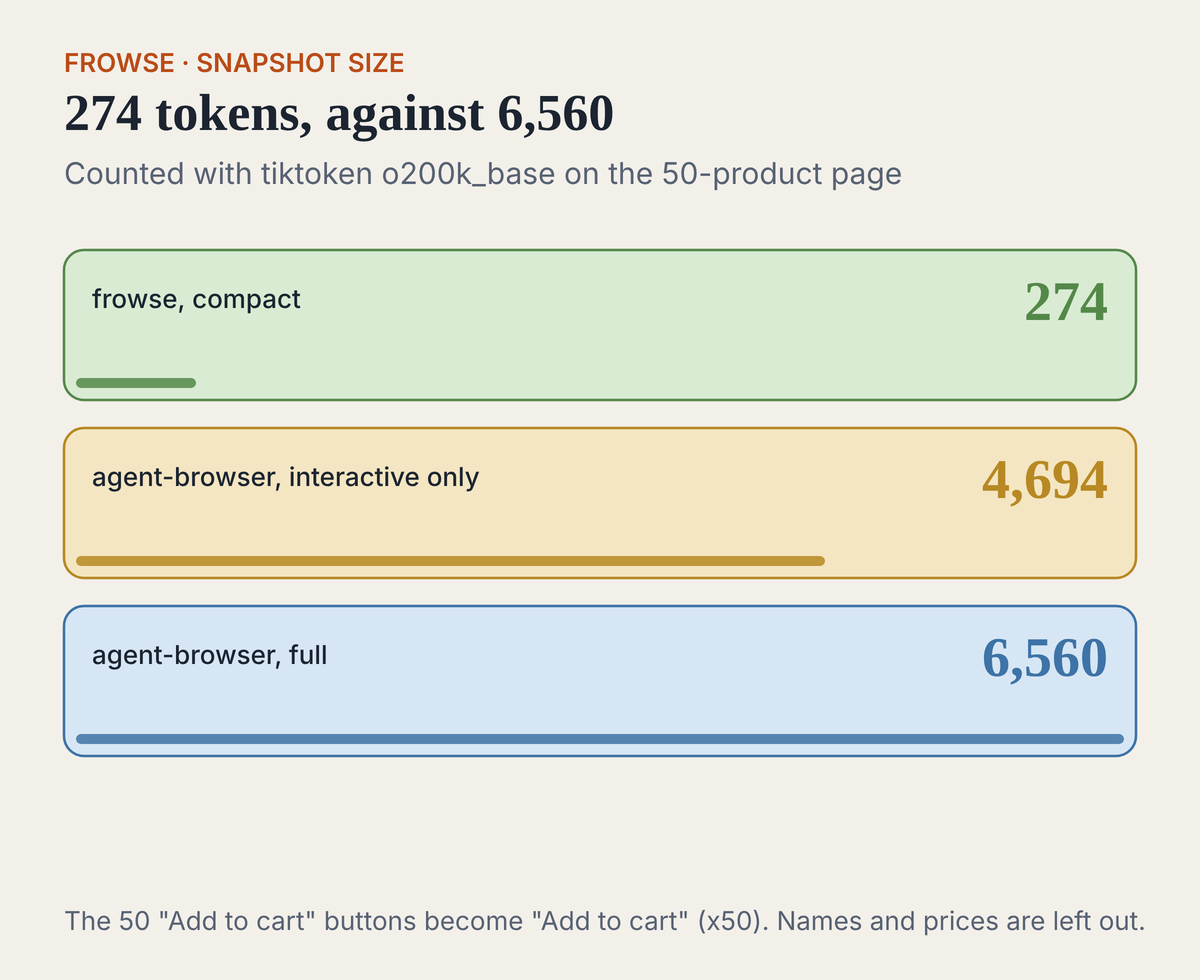
Tools like agent-browser send the AI a full list of everything on the page. That list is measured in tokens, the units a model is billed and limited by, and a product catalog can cost thousands of them each time the agent looks. frowse is a free, open-source (Apache 2.0) command-line tool by Figranium, built to accept the same commands as agent-browser, which lets an AI assistant drive a real browser. The GitHub repo went up on 19 November 2026. Each step re-reads the page, so a roughly 24x smaller summary (6,560 vs 274) cuts the cost of every step in a long task. The short page description is a DOM snapshot: a text outline of the page, not a screenshot. The finder is Folate, a local model, meaning a small program that runs on your computer and needs no API key.
What I tested
Version: frowse 0.1.2 from PyPI, with Folate 0.1.1. Apache 2.0. 3 stars when I checked the repo.
Setup: A local test catalog with 50 products, a search form, and a sign-in dialog. I served it on my machine and compared the same page in agent-browser 0.43.0. No API keys. The pip install took 15 seconds. A model of about 110 MB downloaded on first use; Chromium was already on the machine.
Task I ran: Take a snapshot of the page, then ask frowse in plain English to search, fill forms, sign in, and add specific products to the cart. I also ran the same cart clicks on a copy of the page with the button ids removed.
Time to first result: The first command in the original run, which also downloaded the model, took about 10 seconds. With the model already cached, a snapshot returned in 0.14 seconds.
What worked: The snapshot was much smaller than agent-browser's. Unique controls such as Search, Sign in, and the login fields resolved correctly, and cart buttons with numbered ids were clicked in the right place.
What broke or surprised me: Asking for "Ergonomic Chair v2" clicked a different product and reported success. On the page without button ids, all three cart clicks hit the first item, and again reported success. "Category dropdown" hit a navigation link instead of the select box. Commands after the first one were also slower, and the process was heavier, than the README claims.
Would I use it at work? Yes, to cut snapshot size on pages with clearly labeled, unique controls. Not for a product grid, until the tool warns when several items score almost the same.
How do you try it?
You need Python 3.10 or newer. You can install with pip, or with npm if you prefer (npm install -g frowse); npm still needs Python installed. No API key is required. The first run downloads a model of about 110 MB from Hugging Face, which the README install section does not mention.
Install the tool, then in a terminal open a page, run snapshot to see the short summary, and use click or fill with a plain-English description. Close the session when you are done.
pip install frowse

frowse open https://example.com
frowse snapshot
frowse click "Learn more link"
frowse close
If you want a coding assistant to load the bundled guides, run frowse skills install --target cursor, or use claude or codex instead of cursor. I ran the commands above from the terminal, without those guides.
How much smaller was the snapshot?
I counted tokens with tiktoken's o200k_base encoding, the same one the frowse README uses in its benchmarks. A rough "characters divided by four" estimate would have put the frowse snapshot at 206; the real count is 274.
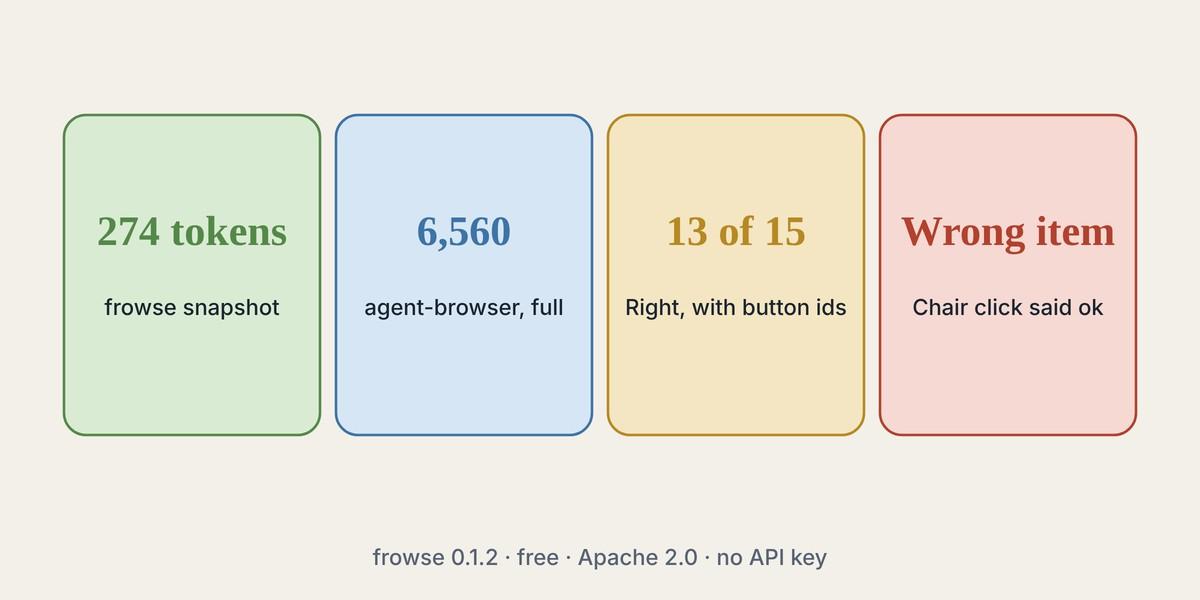
On the 50-product page, the frowse snapshot was 274 tokens. agent-browser's full snapshot was 6,560 tokens, and its interactive-only snapshot, which keeps only the controls you can click or fill, was 4,694. That is about 96% smaller than the full snapshot, and about 94% smaller than the interactive-only one.
The shorter text comes from collapsing repeats. The 50 "Add to cart" buttons become "Add to cart" (x50), and the 50 "Details" links are treated the same way. The snapshot also drops the product names and prices. Only the first few headings show up in the outline, Items 1 to 4, then "+6 more", even though the page has 50 products. Most of the catalog is invisible in the text the agent reads. A closed sign-in dialog stays out of the snapshot until it is opened, which is the right behavior.
snapshot --refs is a compatibility mode that lists every control as @e1, @e2, and so on, the way agent-browser does. That version was 1,160 tokens, still smaller than agent-browser, but much larger than the compact summary.
What did the targeting get right, and wrong?
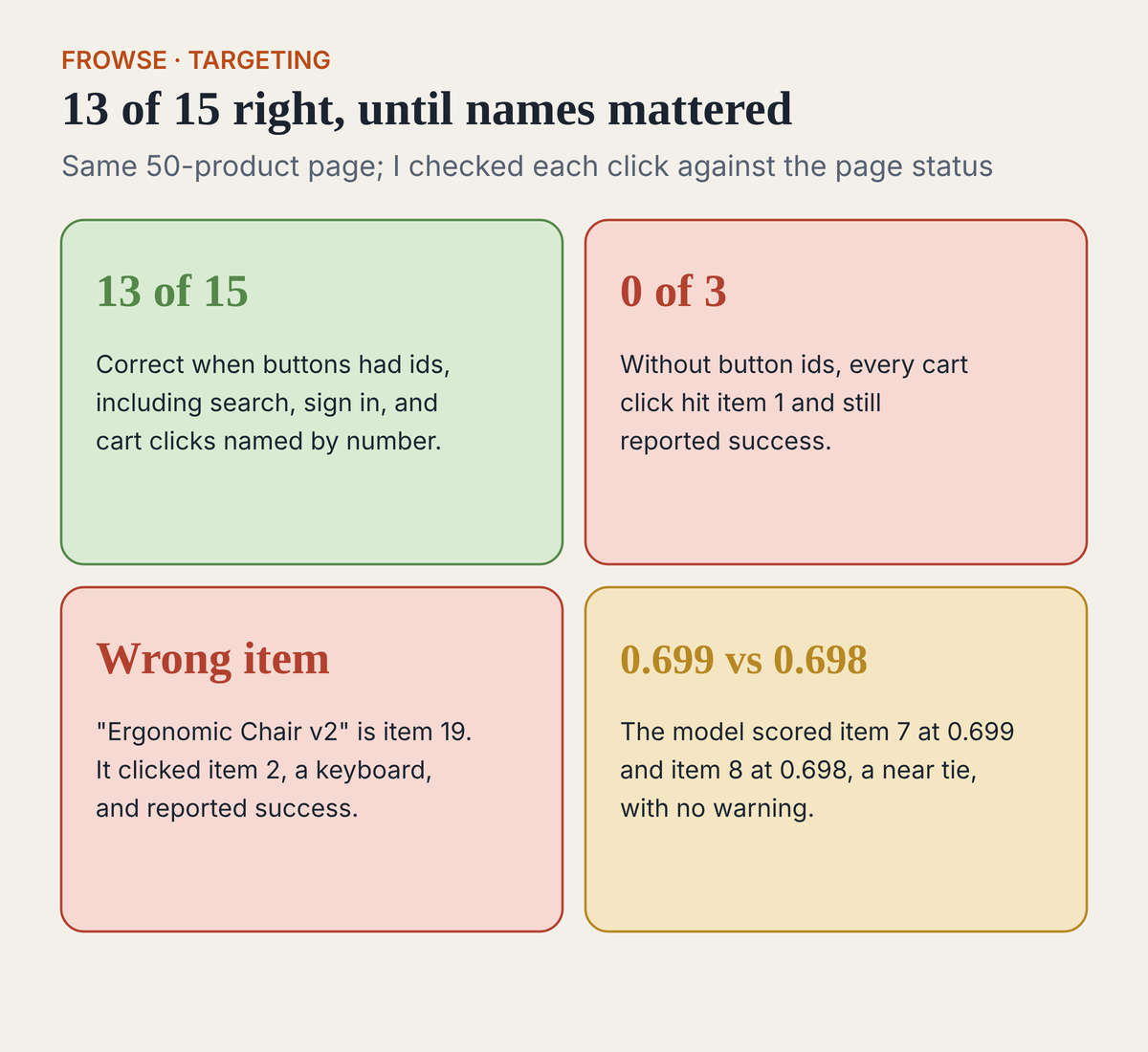
I ran 15 plain-English actions on the page with button ids. 13 were correct, including search, the in-stock checkbox, sign in, the login email and password, a link on example.com, and cart clicks that named an item by number.
Two missed. "Category dropdown" chose the "Categories" link in the navigation, then failed because that link is not a select box. Rephrasing it as "Category select" hit the right control. And click "Add to cart button for Ergonomic Chair v2" clicked item 2, a mechanical keyboard, and reported success. The chair is item 19.
"Add to cart for item 7" was right, but the model scored item 7 at 0.699 and item 8 at 0.698, a near tie. There was no warning. Folate only sees each button's own tag, id, type, text, and parent tag. It does not see the product name sitting next to the button. Numbered ids such as add-7 are enough to get the right row when you ask by number. A name like "Ergonomic Chair v2" never reaches the model, so it can latch onto add-2 instead.
I then removed the id="add-N" attributes and asked for three specific cart buttons. All three clicks hit item 1, the scores were identical, and the command still reported success.
How does it work?
frowse keeps a background session with Chromium, the same engine as Google Chrome, and Folate loaded in memory. snapshot writes the short outline. click, fill, select, and query send your phrase to Folate, which ranks live elements on the page and returns a CSS or XPath selector, the address of the element on the page. You can still pass a CSS selector yourself if you already know it.
The README says each lookup takes 10 to 25 milliseconds and under 250 MB of memory. In my runs, each command took 0.6 to 1.1 seconds once the browser was open, and frowse itself used about 340 to 350 MB, plus the browser.
Installing frowse also adds its own agent-browser command, which can replace the real agent-browser if you have both. It also reuses agent-browser's session setting, so leftovers from the other tool can open frowse on a blank page. That happened to me once.
What does it cost, and what does it not do?
The tool is free and open source under the Apache 2.0 license. A local run needs no API key and makes no model calls to a vendor. You do need Python 3.10 or newer, a one-time model download of about 110 MB, and Chromium. It is early: the published version is 0.1.2, and there were 3 GitHub stars when I checked.
It will not tell you when two elements score almost the same, and the compact snapshot will not show the agent the name of every product in a grid. A wrong click still reports success.
What this means for product and GTM teams
If an agent is walking a catalog, a checkout flow, or a settings screen, a 96% smaller snapshot cuts what the model has to read. On my 50-product page, that saving came from hiding most of the product names. That is also why a request for a named item can land on the wrong button.
I would use frowse to keep unique, clearly labeled controls cheap to read: search, sign in, subscribe. For repeated actions in a grid, I would keep distinguishing ids on the buttons, run query --top-k 3 before a click that has to be exact, and have a person check the result when the action changes a cart or a setting. I would rather keep a slightly larger snapshot than miss a click.
This sits next to other browser tools an agent can use. agent-browser gives the assistant a full list of page controls and a reference for each one. CUA Agent Kit records a model's clicks and turns them into a Playwright script you can replay. frowse is narrower: it is the short snapshot plus a local, no-key lookup of a plain-English target.
Frequently asked questions
What is frowse?
A free, open-source (Apache 2.0) command-line tool by Figranium. It gives an agent a short text summary of a web page and uses a local model, Folate, to turn a plain-English description into a click, fill, or other action. It is built to accept the same commands as agent-browser.
What is a DOM snapshot, and what is a token?
A DOM snapshot is a text outline of the page, listing the controls and a bit of structure, not a picture. Tokens are the units a language model is billed and limited by. I counted them with tiktoken's o200k_base encoding. On my test page the frowse snapshot was 274 tokens, against 6,560 for agent-browser's full snapshot.
Do I need an API key or an AI assistant?
No. I ran open, snapshot, query, click, and fill from the terminal with no API key. The bundled skills are optional, if you want a coding assistant to load the guides.
Why did it click the wrong product?
The compact snapshot hides most product names, and Folate only looks at each button's own label and id, not the name beside it. When I asked for "Ergonomic Chair v2", it clicked add-2 and reported success. When I removed the button ids, every cart click hit the first item.
How is this different from agent-browser?
agent-browser sends a longer list of the page, with a reference for each control, and you click by that reference or by a CSS selector. frowse sends a shorter summary and lets you name the control in plain English. The tradeoff I saw is size versus a silent miss on repeated items.
Sources
frowse repository: https://github.com/figranium/frowse
frowse on PyPI (version 0.1.2): https://pypi.org/project/frowse/
License (Apache 2.0): https://github.com/figranium/frowse/blob/main/LICENSE
Folate repository: https://github.com/figranium/folate
Folate model on Hugging Face: https://huggingface.co/figranium/folate
agent-browser repository: https://github.com/vercel-labs/agent-browser
tiktoken (
o200k_base): https://github.com/openai/tiktoken

Kartikay Dhar
Head of Product at Sprouts.ai, where he leads One Platform, Sprouts Data Universe and the Sprouts MCP. On Instagram he shares one free GitHub repo a day.
Related articles
Cloudflare Code Mode tested: fewer tokens, right answers
A small model miscounted in all 3 normal tool-calling runs. With Cloudflare Code Mode it was right every time, on about one-seventh of the input tokens.
ui-diff tested: visual QA that caught a contrast bug
I ran ui-diff on a two-page demo. It caught a 1.91:1 contrast drop, and Cursor's agent correctly explained a misleading focus-order note.
DeepSeek Super-agent is a router for coding work
DeepSeek Super-agent is a research prototype for a proactive GitHub coding agent on DeepSeek Harness. Here is what the open docs say it is, and is not.