agent-dream tested: AI memory that cites its sources
I ran agent-dream, a free MCP server that turns past coding chats into memory pages. Each fact cites its messages, and a fake citation was rejected.

Head of Product at Sprouts.ai
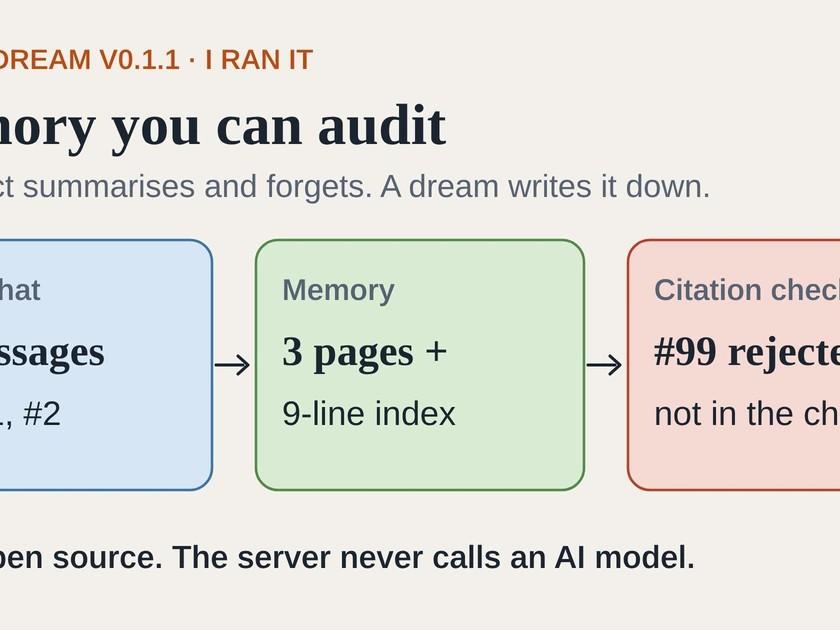
AI coding assistants forget what you agreed once a chat ends. agent-dream saves those decisions as short notes inside your project, and each note points to the exact messages it came from, so you can check it. I ran version 0.1.1 on a small test chat to see whether that holds up.
agent-dream is free and open source, from GitHub user youssbm. It is an MCP server, which is an add-on that gives an AI assistant extra tools. It reads your past Claude Code, Codex or opencode chats and turns them into small memory pages plus a short index file, MEMORY.md.
The problem it goes after is familiar if you use an AI assistant for coding. The assistant works from its context, meaning what it can see right now. When a chat gets long, you run /compact and it shrinks the conversation into a summary that fits. That summary lives inside the session. Start a new one and it is gone, and you can't easily check the summary against what was actually said. The README puts it in one line: "/compact shrinks the current context, and the summary dies with the session. /dream writes durable memory instead."
The unusual part is that the server never calls an AI model. The model you already run does the reading and writing, one step at a time, and the server checks each answer before it accepts it. I have written before about the Ralph loop, which keeps state in plain files between fresh sessions. agent-dream takes the same idea further, with memory kept in files you can open, check and roll back.
What I tested
Version: agent-dream-mcp 0.1.1 from npm. The README labels it v0.1, pre-release.
Setup: one install command, about a second. The package is a single file with no dependencies. I used no API keys and no network connection.
Task I ran: a short, made-up Claude Code session with three messages. In message #0 the user asks to fix a CSV importer that breaks on semicolon-separated vendor files. In #1 the assistant says it switched to delimiter detection and 12 tests pass. In #2 the user says: always run tests with
pytest -q, and never touchvendor/files.How I drove it: I did not plug it into Claude Code. I talked to the server directly with a small script and wrote the model's answer to every step myself, by hand. So this run shows what the server asks for, what it accepts and what it saves. How good the pages are depends on the model you connect.
Speed: each server reply took 2 to 111 milliseconds. The server never calls a model, so any wait comes from your own model doing the steps.
What worked: it saved three linked pages and a 9-line, 331-byte MEMORY.md, each fact tagged with its source messages. Search found all three pages. A fake citation I submitted on purpose was rejected.
What broke or surprised me: long instructions on every step, seven round trips (each one back-and-forth with your model) for a three-message chat, and a saved note that was marked as handled without anything checking where it went.
Is it ready for work? It is a v0.1 pre-release, published this week, and the README says a full dream has only been run end to end in opencode. In my run the checks and saved files worked as described, but the usage counter and note tracking had gaps, and page quality depends on the model doing the steps. That fits a trial on one project where someone reviews the pages. Sharing memory across a team is awkward today, as the README notes.
It is MIT licensed and free. The cost is your own model's usage, since your model does all the reading and writing.
How does a dream work?
A "dream" is the tool's name for one memory-writing run. You start it, and the server hands your model one small task at a time with instructions, the input and the exact format it expects back. The model answers, the server checks the answer, then sends the next task. If the answer fails a check, the same task comes back with the reasons.
In my run there were seven tasks:
Extract: list the facts worth keeping, each with the message numbers it came from. I submitted three: the delimiter decision, the
pytest -qrule and thevendor/rule.Patterns: look for things that repeat, such as the same failure twice. There were none.
Outline: plan which pages to create. I planned two.
Write page: the testing and repo rules page.
Write page: the CSV importer page.
Thread state: a page on where the work stands: goal, decisions, what's done, what's next.
Promote: rewrite MEMORY.md, the short index a new session loads first.
Then a commit wrote everything to a .dream/ folder inside the project. A commit is a saved version you can undo. Each one goes into that folder's own git history, which is the list of saved versions. The README says any dream can be undone with a rollback command, which goes back to the version before it.
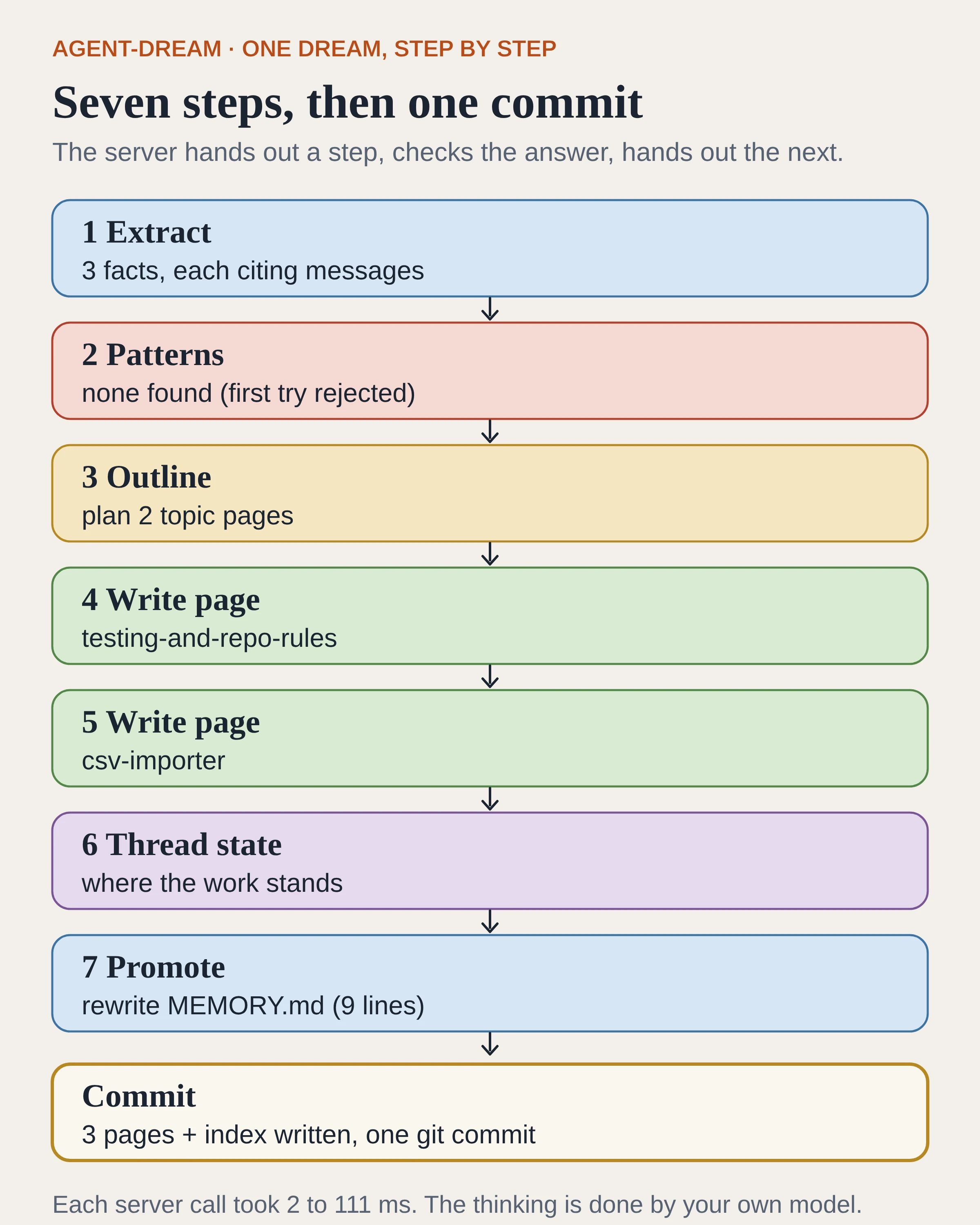
The seven steps of my dream run, then the commit. Step 2 shows red because my first answer was rejected.
What did the saved memory look like?
The commit created three pages: csv-importer, testing-and-repo-rules and a thread page for the session. The rules page, minus its header, reads like a note a teammate would leave:
# Testing and repo rules

- Run tests with `pytest -q` (user rule).
- Never edit files under `vendor/`.

See [[csv-importer]].
The header above that text is what makes it auditable. It records the source as Claude Code, session s1, message 2, with the confidence set to verified and a verified date. The CSV page cites messages 0 to 1. The thread page cites 0 to 2. If you doubt a line, you know which messages to reread.
The index was 9 lines and 331 bytes: one line on the project, a link to the active thread, the top rules, and a one-line map of the two topic pages. The cap is 200 lines, so a new session starts with a short list and pulls in pages only when it needs them.
When I searched memory for "pytest", all three pages came back, each with its source messages attached.
Does it really reject made-up sources?
This was the test I cared about most. AI summaries are easy to write and hard to check. A memory tool that lets the model cite anything would just give made-up facts a footnote.
So at the patterns step I submitted a false claim on purpose: "User repeatedly asked to skip tests", citing message #99. The chat only had messages #0 to #2. The server refused it with a plain reason: msgs "99" is past the end of claude-code:s1 (last message #2). It then offered the same step again. Nothing was saved until I sent a valid answer.
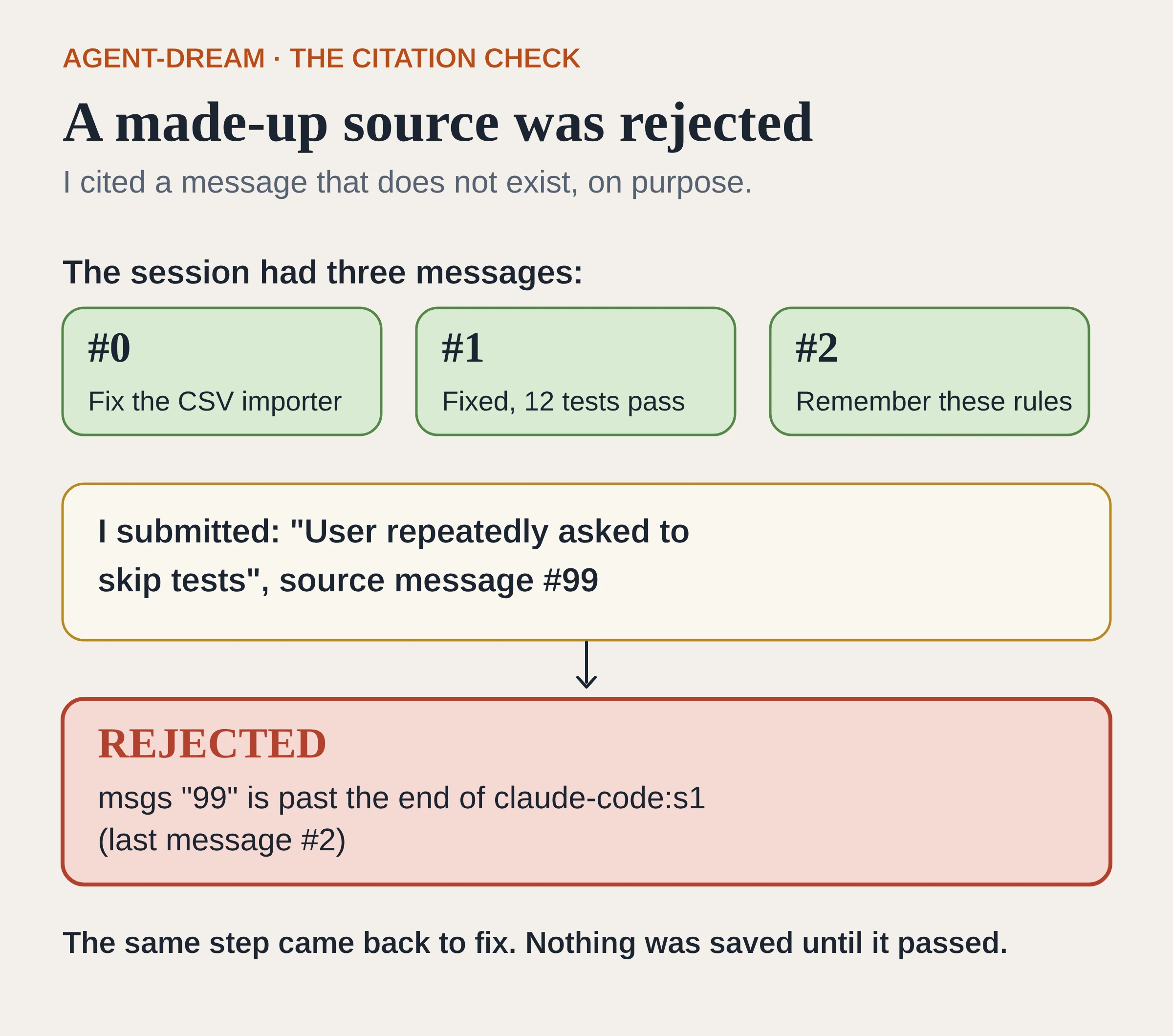
The fake citation to message #99 was rejected, and the same step came back to fix.
This check is about whether a cited message exists. It does not judge whether the claim is true. A model could still cite message #2 for something message #2 never said. For changes to existing memory, the README describes a stricter rule: correcting or deleting a saved fact needs an exact quote from the chat, and the server checks that the quote is really in the cited messages.
What does it cost, and where is the catch?
The software is free. You pay in your model's usage, because your model reads the chat and writes every page. The server keeps a running estimate in tokens, the unit models measure and bill usage in, about four characters each. My whole dream showed 1,394 of a 150,000-token limit.
That number undersells the real cost. Every step comes with long written instructions and a strict answer format. The first step's reply alone was about 5,180 characters, yet the counter at that point read 298 tokens. By the tool's own four-characters rule, that reply is roughly 1,300 tokens. The counter appears to track the chat being processed, not the instructions sent each time. Expect real usage to be well above what the counter shows.
It is also chatty. Three short messages took seven steps plus a commit, each a separate round trip. Pages are written one per step, so a long chat with many topics means many more steps.
Notes are not tracked into pages. Before the dream I saved a quick note with the same rules using the note tool. The model was shown it in step 1. After the commit the note inbox was empty and the log said one note was used, yet no page cites the note. My note repeated message #2, so nothing was lost here, but nothing checked that the note made it into a page.
The README is frank about other early limits. Its status note says a full dream has been run end to end with a real model only in opencode 2.2.6. Codex, Claude Code and VS Code have not been tested end to end yet. Sessions are matched by folder, so a chat started in a subfolder is missed. The server can't shrink your context itself, so you still run /compact afterwards. Sharing memory with a team is awkward because .dream/ has its own git repository. There are no benchmark results yet.
What this means for product and GTM teams
The design is the part that carries over to other products. The model proposes each piece of memory, plain code checks it, and nothing is saved without a source. In my run that check caught a made-up citation before anything was written. The same pattern fits any AI feature that remembers things for people, such as an account history or notes from a customer call, because each saved fact can point back to where it came from.
It also makes review easier. You read short pages and check the ones that matter against the messages they cite. Projects like Kiro Crew and YC's QM treat memory as part of the workspace too. agent-dream adds a check on where each saved fact came from.
For a PM, the practical question is cost. A dream runs on your own model, step by step, with long instructions each time. Budget for that, and run it at natural stopping points rather than after every chat.
How to try it
The author has only run a full dream in opencode so far. The Claude Code steps below come from the README, and I haven't run them.
Install Node.js 22.13 or newer. Git is recommended for the memory history.
For Claude Code, add the server to your project with:
claude mcp add --transport stdio \
  --scope project agent-dream \
  -- npx -y agent-dream-mcp
The README lists the matching commands for opencode and Codex.
Add the README's one-line instruction to your project's
CLAUDE.mdorAGENTS.md, so each new session loads the memory index first.After a good chunk of work, run
/agent-dream:dreamin Claude Code, or ask "run a dream" in Codex. Then run/compactor start a fresh session.Open
.dream/MEMORY.mdand.dream/log.md, and spot-check a few cited messages before you trust the pages.
Start on a side project. The memory stays in your project folder and is added to .gitignore, but your chats are still read by whatever model you run.
Frequently asked questions
Is agent-dream free?
Yes. It is MIT licensed with no paid tier. The cost is your own model's usage, since your model does every step.
Does it replace /compact?
No. It writes lasting memory before you compact or start fresh. You still run /compact yourself, because an MCP server cannot shrink your context.
Can the model invent a source for a fact?
In my run, a citation to a message that did not exist was rejected. The check confirms the message exists, not that it says what the fact claims, so spot-check important pages.
Where is the memory stored?
In a .dream/ folder inside your project, with its own git history. The README says it makes no network calls and calls no model.
Which tools does it support?
The README lists Claude Code, Codex and opencode for reading past chats. VS Code with Copilot can use the tools but its chats are not read yet. The author has only run a full dream end to end in opencode so far; Codex, Claude Code and VS Code have not been tested end to end yet.
Sources
agent-dream on GitHub: README with how it works, setup per host, safety notes, configuration and limitations. Checked 12 Nov 2026 (IST).
agent-dream-mcp on npm: version 0.1.1, the package I installed. Checked 12 Nov 2026 (IST).
agent-dream licence: MIT.
The components of agent memory, Anthropic: the post the README says the approach follows.

Kartikay Dhar
Head of Product at Sprouts.ai, where he leads One Platform, Sprouts Data Universe and the Sprouts MCP. On Instagram he shares one free GitHub repo a day.
Related articles
ui-diff tested: visual QA that caught a contrast bug
I ran ui-diff on a two-page demo. It caught a 1.91:1 contrast drop, and Cursor's agent correctly explained a misleading focus-order note.
DeepSeek Super-agent is a router for coding work
DeepSeek Super-agent is a research prototype for a proactive GitHub coding agent on DeepSeek Harness. Here is what the open docs say it is, and is not.
n8n's Nod: a personal agent that must quote you first
Nod is n8n Labs' free, open-source personal agent. Before it sends or pays, a checker must quote your words. Here is how it works and what it costs.