AWS Emulator tested: S3, DynamoDB and Lambda locally
I ran six AWS services, including S3, DynamoDB and Lambda, on AWS Emulator, a free local stand-in. It took about 3 seconds; 63% of AWS's checks pass.

Head of Product at Sprouts.ai
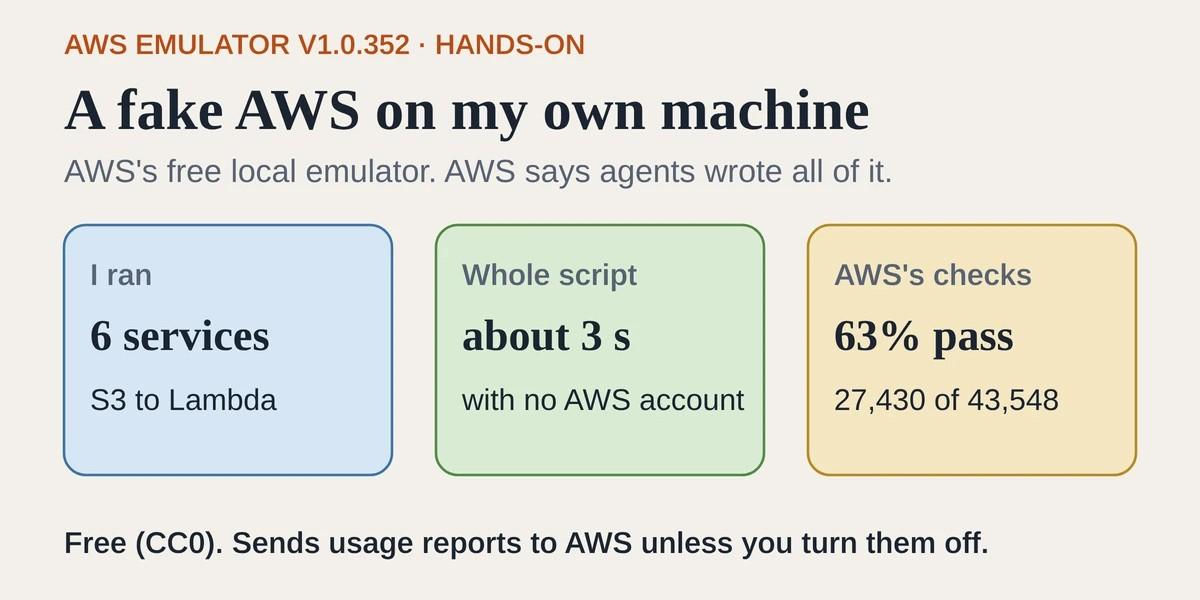
AWS Emulator is a free, open-source stand-in for AWS (Amazon Web Services, Amazon's cloud) that runs on your own computer. A team, or a coding agent, can run its tests against it on a laptop with no AWS account, no AWS bill and nothing left behind afterwards. The catch: about 63% of AWS's own checks pass, and permission rules aren't checked the way AWS checks them. AWS launched it on 11 November 2026 and says autonomous AI agents wrote every line.
I downloaded the Linux version and pointed a Python test script at it. The script used six AWS services: S3, which stores files; DynamoDB, a database; SQS, a message queue; SNS, which sends notifications; Lambda, which runs small bits of code on demand; and STS, which checks which account you're signed in as. The whole run took about 3 seconds.
What I tested
Version: AWS Emulator 1.0.352, release date 13 November 2026, from AWS's official installer for Debian and Ubuntu Linux.
Setup: downloading the 182 MB installer and unpacking it took me about 2 seconds. Inside is a single program file of about 1 GB.
Task I ran: a Python script using AWS's official Python library. It made the calls an app would make to all six services.
Time to first result: the emulator was ready about 80 milliseconds after I started it. The full script finished in about 3 seconds.
What worked: every step in all six services once the database table was ready.
What broke or surprised me: my first DynamoDB writes failed because the table was still being set up. Real AWS behaves the same way. It also sends usage reports to AWS unless you switch them off, and it used more memory than AWS's own docs suggest.
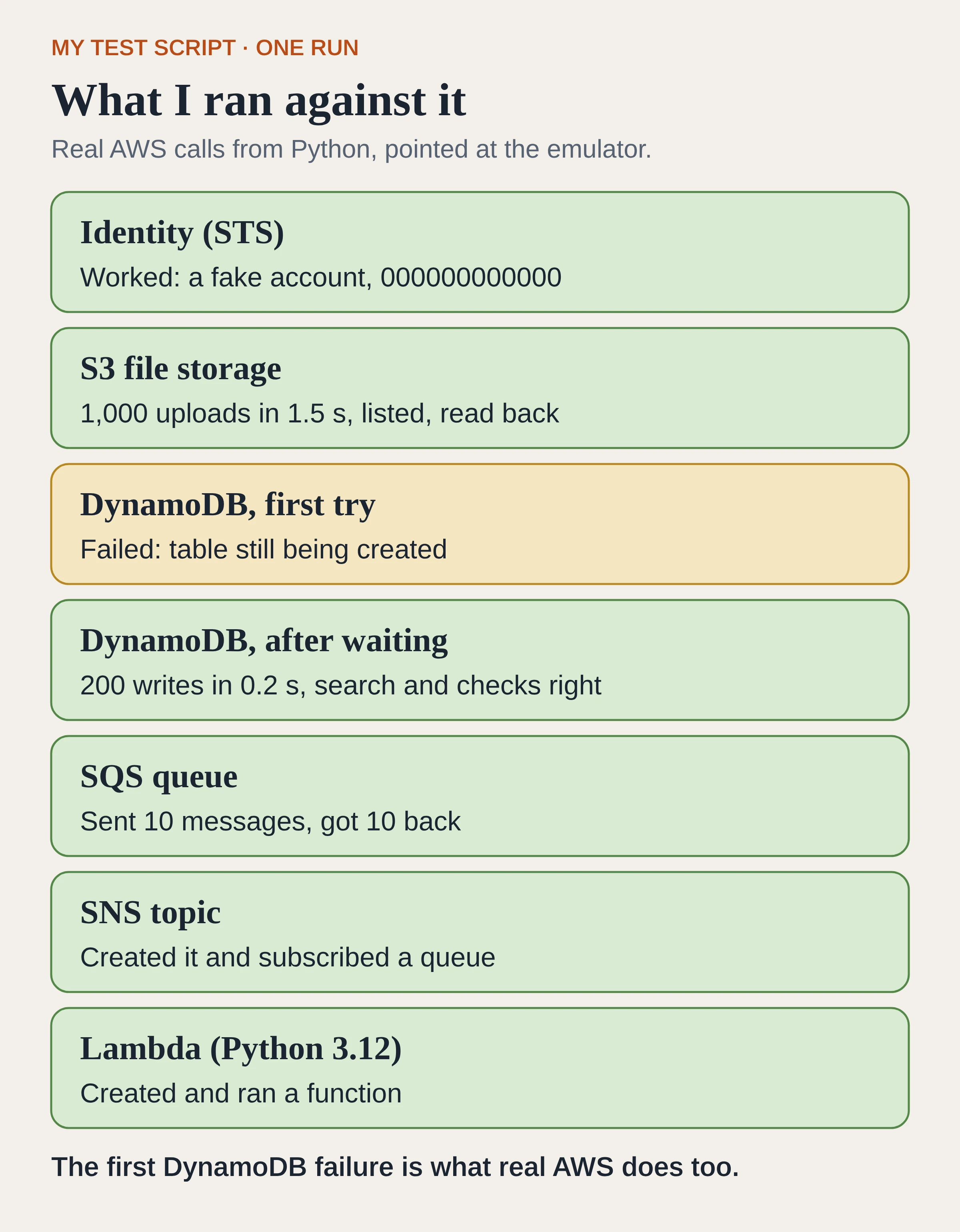
My test script across six services, redrawn from its output.
What is AWS Emulator?
Programs talk to AWS by sending it requests: create a storage bucket, write a row to a database, run a function. AWS Emulator answers those same requests on your own machine. The aws/aws-emulator repo is written in Rust and released under CC0, which means AWS has given up copyright on it.
You start it, and it listens at a local address, by default https://127.0.0.1:9297. Then you change a few settings so your tools send their requests there instead of to AWS. Your application code stays the same. The emulator keeps everything in memory, so when you stop it, every bucket, table and queue you made is gone.
On Linux you install it like any other Linux program. On Mac and Windows, AWS's docs have you run it inside Docker, a tool for running programs in a sealed box, and you build that box yourself from a short recipe. AWS doesn't publish a ready-made one.
According to AWS's launch post, AWS builds it from the same machine-readable descriptions of each service that its official code libraries are made from. That way, requests and error messages have the same shape as on AWS.
Did agents really write it?
That is AWS's claim, and I can't check it from the outside. In a post on About Amazon, AWS Sr. Principal Engineer Matthew Goldberg writes that thousands of autonomous agents wrote every line, and that his team "hasn't written or reviewed any of the code."
He describes three teams of agents. One writes fidelity tests, short scripts that run a real task against real AWS and record exactly what comes back. A second team replays those tests against the emulator and files an issue for each difference. A third team fixes one issue at a time. Each fix has to pass automatic checks before it goes in: the code must build into a working program, follow coding standards, pass a security review by another agent and not make any fidelity test worse.
The repo backs up part of this. Gaps the agents haven't fixed sit in issues/things-that-do-not-work/, and fixed ones move to issues/things-that-now-work/.
What happened when I ran my test script?
I started the emulator with two things switched off: the usage reports it sends to AWS, and the check that every request uses the emulator's own keys. Then I ran one Python script against it.
STS, S3, SQS and SNS
The STS check returned a fake account, 000000000000.
S3 took 1,000 small file uploads in 1.5 seconds. Listing them page by page returned all 1,000, and reading one back returned the right contents. SQS took 10 messages and handed all 10 back. SNS created a topic and subscribed my queue to it.
Lambda
I uploaded a small Python 3.12 function and called it. It returned {"hello": "kd"}, the answer my code should give. The step took 1.2 seconds, but a full second of that was a pause I had put in my script before the call.
DynamoDB, the step that failed
My script created a DynamoDB table and immediately wrote 200 rows to it. All three DynamoDB steps failed with a "table not found" error (ResourceNotFoundException).
The table did exist. It just wasn't ready. Real DynamoDB does the same thing: a new table is marked as still being created for a short while before it is ready for use, and DynamoDB's docs for writing a row say this error can mean the table isn't ready yet.
I fixed it the normal way, with a waiter, a built-in helper that keeps asking until the table is ready. When I ran it again from a fresh start, the table was ready within about 1.6 seconds. After that, 200 writes took 0.2 seconds. A search for one account's rows with a score above 100 returned 10 out of 20, which is correct for my data. A write with an "only if this row doesn't exist" condition was refused with a "condition failed" error (ConditionalCheckFailedException), the same error AWS gives.
Speed and memory
I ran the same script twice and got 3.1 seconds and 2.7 seconds. AWS's Linux guide says the emulator uses about 170 MB of memory when idle. I saw about 310 MB right after starting and about 425 MB once my script had finished.
How close is it to real AWS?
AWS publishes a fidelity score with every release. Each fidelity test is checked against real AWS first. It passes on the emulator only if every reply matches AWS, including the status code, the body and the exact error message.
I downloaded the scores file for release 1.0.352, the version I ran. It lists 43,548 tests: 27,430 pass, 16,035 fail and 83 are skipped. That is 63% overall.
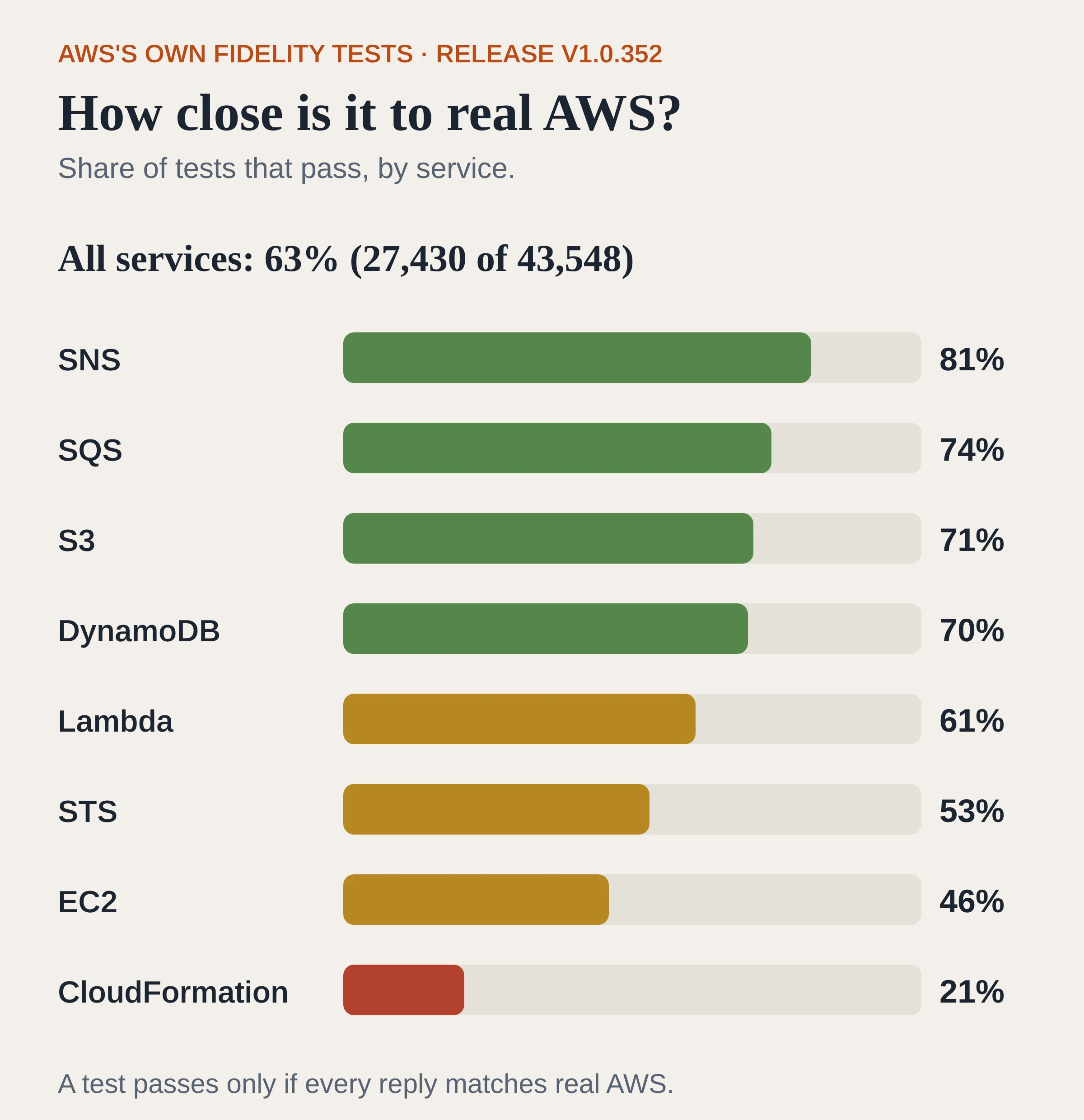
Pass rates I counted from the release's scores file. A test can cover more than one service.
The overall number hides big differences between services. The six I used range from 53% for STS to 81% for SNS. EC2, AWS's virtual server service, is at 46%. CloudFormation, which builds whole sets of resources from one template, is at 21%.
AWS asks you to read a score as a snapshot. When the agents add tests, a score can go down while the emulator gets better.
Where does it differ from real AWS?
AWS's own launch post lists the main gaps:
It doesn't evaluate AWS's permission rules (IAM) the way AWS does, so a request that AWS denies might succeed in the emulator. AWS says not to use it to test security.
Each emulator acts as one account. Nothing works across accounts or across AWS's regions, the separate data center areas it runs in.
If a feature isn't built yet, the emulator returns an error saying so, and a test that hits it fails straight away.
Everything lives in memory and disappears when you stop it.
Usage and error reports to AWS are on by default. The README says they never include your requests, responses, code or credentials. You can turn them off with --telemetry off, a setting in your terminal or a config file. I ran with them off.
How do I try it?
This is a job for an engineer, and a short one. A good first test is to point one existing test suite at the emulator and see what passes.
On a Debian or Ubuntu Linux machine, download and install it:
P=https://downloads.aws.com/aws-emulator
P=$P/packages/aws-emulator/LTS/latest
curl -fsSLo aws-emulator.deb \
  $P/aws-emulator_amd64.deb
sudo apt-get install -y ./aws-emulator.deb
Start it with usage reports off:
aws-emulator --telemetry offIn a second terminal, set these environment variables, the settings that tell AWS tools where to send requests and which keys to use:
E=~/.aws/emulator/9297
export AWS_ENDPOINT_URL=https://127.0.0.1:9297
export AWS_REGION=us-east-1
export AWS_CONFIG_FILE=$E/config
export AWS_SHARED_CREDENTIALS_FILE=\
$E/emulator_credentials
aws sts get-caller-identity
If it worked, the last command comes back with account 000000000000, the emulator's fake account, not your real one.
By default the emulator only accepts requests that use the keys it creates in that folder, so your real AWS keys won't work against it. I started mine with --auth off, which turns that check off, so my script could use dummy keys. Other Linux versions, Mac and Windows have their own steps in the AWS Emulator user guide.
Before you rely on it, look up the services your app uses in the latest scores file on the releases page.
What this means for product and GTM teams
Tests that call real AWS need an account, credentials and resources set up in the cloud, and those resources can cost money. My script made more than 1,000 calls in about 3 seconds against something that has no fee and keeps nothing once you stop it.
The emulator also caught a real bug in my script: writing to a table before it was ready. A fake that always says yes would have hidden that until the code reached the real cloud.
The fidelity number is the part to look at before anyone relies on it. If your app is mostly S3, SQS, SNS and DynamoDB, most of AWS's tests pass for those services. If it depends on CloudFormation, about one test in five passes. Permission rules aren't checked the way AWS checks them, so a passing local test says nothing about whether a real user would be blocked.
I can't check who wrote it, but I can check how well it works: the scores file shows which tests pass and fail. I did that for the six services I used.
A coding agent can run against a local emulator as easily as a person can, and AWS's launch post shows its coding agent Kiro doing exactly that. I wrote about the setup around coding agents in my posts on harness engineering and tester-army's checks for coding agents.
Frequently asked questions
Is AWS Emulator free?
Yes. AWS charges no service fee and the code is released under CC0. You pay only for real AWS resources when you deploy.
Do I need an AWS account to use it?
No. It creates its own keys and a fake account, 000000000000. Requests never reach AWS.
Can I use it to test AWS permission rules (IAM)?
No. AWS says it doesn't evaluate IAM policies the way AWS does, so a request that AWS denies might succeed in the emulator. Test security on real AWS.
Does it send data to AWS?
By default it sends usage and error reports. The README says these never include your requests, responses, code or credentials. Start it with --telemetry off to stop them.
Sources
aws/aws-emulator on GitHub (README, license and telemetry section, checked 14 Nov 2026)
AWS Emulator releases and fidelity scores (release 1.0.352, checked 14 Nov 2026)
Test your applications against AWS locally with AWS Emulator, AWS News Blog, 11 Nov 2026
How we built the agents that built AWS Emulator, About Amazon, 11 Nov 2026
Getting started on Linux, AWS Emulator user guide (checked 14 Nov 2026)
PutItem, Amazon DynamoDB API reference (checked 14 Nov 2026)

Kartikay Dhar
Head of Product at Sprouts.ai, where he leads One Platform, Sprouts Data Universe and the Sprouts MCP. On Instagram he shares one free GitHub repo a day.
Related articles
ui-diff tested: visual QA that caught a contrast bug
I ran ui-diff on a two-page demo. It caught a 1.91:1 contrast drop, and Cursor's agent correctly explained a misleading focus-order note.
DeepSeek Super-agent is a router for coding work
DeepSeek Super-agent is a research prototype for a proactive GitHub coding agent on DeepSeek Harness. Here is what the open docs say it is, and is not.
agent-dream tested: AI memory that cites its sources
I ran agent-dream, a free MCP server that turns past coding chats into memory pages. Each fact cites its messages, and a fake citation was rejected.