Do Browser Agents Need Chrome? Lightpanda, Tested
Lightpanda, a headless browser built in Zig, ran the same Puppeteer script as Chrome with about 16x less memory. Results, caveats and when to switch.

Head of Product at Sprouts.ai

For a lot of browser agent work, no. Lightpanda is an open-source headless browser written from scratch in Zig that speaks the same Chrome DevTools Protocol as Chrome. In a small test I ran on 1 Nov 2026, the same Puppeteer script scraped five pages with about 16x less memory and about 31% less time than headless Chrome.
The repo is lightpanda-io/browser, licensed under AGPL-3.0. When I checked the GitHub API on 1 Nov 2026 at 09:31 IST it had 39,334 stars and 1,913 forks. The latest stable release is 1.0.2, published 23 Oct 2026, and nightly builds ship alongside it. It isn't a Chromium fork. It uses V8 for JavaScript, html5ever for HTML parsing and libcurl for networking, and its site describes it as having no graphical rendering.
What I tested
I ran this benchmark on my Linux test machine on 1 Nov 2026, between 9:25 and 9:30 IST. The setup:
- Machine: x86_64 Linux with 16 GB of RAM, Node 20.19.2 and puppeteer-core 25.16.0.
- Lightpanda: the official nightly binary, version 1.1.0-nightly.11471, a single 77 MB file, started with
lightpanda serve. - Chrome: Google Chrome 156.0.8078.47 in
--headless=newmode. - Task: one Puppeteer script, unchanged for both browsers, that opened five public pages and pulled out the title, link count and page items. The pages were example.com, the Hacker News front page, quotes.toscrape.com/js (quotes rendered by JavaScript), the Wikipedia page for Zig and books.toscrape.com.
- Runs: three per browser, alternating between them, with a fresh browser process each time. Memory was sampled from the browser's process tree every 100 ms.
Getting Lightpanda going took a download, a chmod and one command. No account or API key:
curl -L -o lightpanda https://github.com/lightpanda-io/browser/releases/download/nightly/lightpanda-x86_64-linux
chmod a+x ./lightpanda
./lightpanda serve --host 127.0.0.1 --port 9222
The script connected with puppeteer.connect() to port 9222, the same way it connected to Chrome.
What were the results?
| Mean of 3 runs | Lightpanda | Chrome |
|---|---|---|
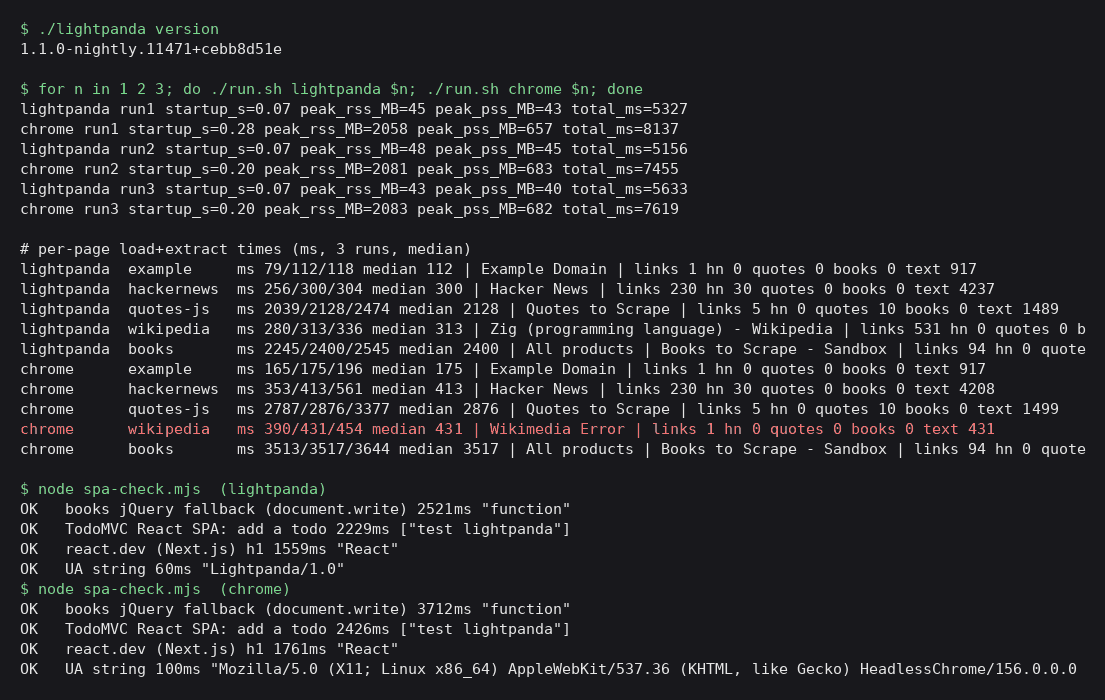
| Total time for 5 pages | 5,372 ms | 7,737 ms |
| Peak memory (PSS) | 43 MB | 674 MB |
| Peak memory (RSS, summed) | 45 MB | 2,074 MB |
| Startup (server ready) | 0.07 s | 0.20 to 0.28 s |
PSS is the fairer memory number. It counts memory shared between processes once, and Chrome runs many processes that share a lot. By PSS, Lightpanda used about 16x less. Summed RSS makes the gap look like 46x, which overstates it.
Per-page median times, in milliseconds:
| Page | Lightpanda | Chrome |
|---|---|---|
| example.com | 112 | 175 |
| Hacker News | 300 | 413 |
| quotes. | 2,128 | 2,876 |
| Wikipedia (Zig) | 313 | 431 (see note) |
| books. | 2,400 | 3,517 |
Note on Wikipedia: on the first Chrome run, Wikipedia served headless Chrome a "Wikimedia Error" page instead of the article, so Chrome's median there mixes an error page with two real loads.
Did both browsers get the same data?
Mostly. Both found the same 30 Hacker News stories and 230 links, the 10 JavaScript-rendered quotes and the 20 book cards. On Wikipedia, Lightpanda got the article on all three runs with 531 links, and Chrome matched that on its second and third runs. The visible text lengths differed slightly, by up to about 9% on Wikipedia, which points to small differences in how each browser computes rendered text.
A second script checked a few interactive cases on both browsers. Both added an item in the TodoMVC React app by typing and pressing Enter, read the main heading on react.dev, and saw the jQuery fallback on books.toscrape.com load.
What went wrong?
On books.toscrape.com, Lightpanda logged uncaught JavaScript exceptions on every run: five each on the first two runs, two on the third. They included jQuery is not defined, $ is not defined and "Bootstrap's JavaScript requires jQuery". The page loads jQuery through a document.write fallback, and later scripts seem to run before it's ready. The scraped data was still right, but a site whose own JavaScript matters to your task could behave differently.
The user agent matters too. Lightpanda reports Lightpanda/1.0 and Chrome reports HeadlessChrome/156. Wikipedia served headless Chrome an error page once and served Lightpanda the article every time, and other sites with bot rules will treat the two differently in either direction.
How much should you trust these numbers?
Read the timing as a direction rather than a precise figure. This was three runs over five pages on a live network, and two of those pages spent around two seconds waiting on slow servers, which is the same for both browsers. The startup check polled every 50 ms, so it can't resolve small differences. The memory gap was large and held across all three runs. Lightpanda's own README claims about 16x less memory and about 9x faster on its own crawler benchmark of real web pages on an AWS EC2 m5.large. The memory figure roughly matches this test. The speed claim depends on the workload, and this test's speed gap was much smaller.
What didn't I test?
I didn't test several things a real agent would need: sites with strong bot protection, WebSocket-heavy apps, long sessions with logins, and Lightpanda's built-in MCP server and agent mode. The README says the MCP server can run over stdio or HTTP, with a separate browsing session per client. That's worth its own test.
Lightpanda has no graphical rendering. The README mentions --dump png and --dump pdf options for a text-only rendering, so it can't replace Chrome for visual checks or screenshots of a real layout. Telemetry is also on by default, and I left it on during this test. Set LIGHTPANDA_DISABLE_TELEMETRY=true to turn it off.
When should you pick Lightpanda over Chrome?
Pick it when the job is reading: scraping, checking pages, collecting data for an agent to reason over, and running many sessions at once. The CDP compatibility means existing Puppeteer code can try it by changing one connection URL. Keep Chrome when you need pixels, broad site compatibility or the browser fingerprint most sites expect.
If you're building agents that browse, the browser is part of the harness, and swapping it is the kind of choice harness engineering is about. For sites you control, WebMCP goes further by giving agents typed tools instead of pages to scrape. And if you're comparing agent setups, measure them the way Microsoft Scope does for coding agents: same task, same inputs, more than one run.
Check the license before you build on it. AGPL-3.0 applies obligations if you modify Lightpanda and offer it to others over a network.
What this means for product and GTM teams
Most browser automation I see in product and GTM work is reading pages: pulling a pricing table, checking a docs page, collecting public listings for research. None of that needs pixels. If memory drops from hundreds of megabytes per browser to tens, you can run far more sessions on the same machine, and the cost of an agent that reads the web goes down with it.
I wouldn't swap Chrome out everywhere. Anything that needs a screenshot, a visual check or a site that treats unknown browsers with suspicion still belongs on Chrome. I'd start by moving the read-only jobs to Lightpanda, keep Chrome as the fallback, and compare the extracted data for a week before trusting it.
Frequently asked questions
Is Lightpanda a Chromium fork?
No. It's a new browser written in Zig. It uses V8 for JavaScript, html5ever for HTML parsing and libcurl for networking, and it has no graphical rendering.
Does Lightpanda work with Puppeteer and Playwright?
It runs a Chrome DevTools Protocol server, so Puppeteer connects to it as it would to Chrome. In my test the same puppeteer-core script ran unchanged on both. The README also lists WebDriver BiDi support.
Can Lightpanda take screenshots?
Not of a real visual layout. It has no graphical rendering, and its PNG and PDF dump options produce a text-only rendering. Use Chrome for visual tasks.
Is Lightpanda free?
Yes, it's open source under AGPL-3.0. Check what the license requires if you modify it and offer it as a network service.
How much memory does Lightpanda save?
In this five-page test, peak memory was 43 MB against 674 MB for headless Chrome, measured by PSS, about 16x less. Your numbers will depend on the pages and how many sessions you run.
Sources
- lightpanda-io/browser on GitHub (README, stars and license checked 1 Nov 2026)
- Lightpanda homepage
- Lightpanda releases (1.0.2 stable, nightly builds)
- Lightpanda license (AGPL-3.0)
- Lightpanda benchmark details (vendor)
- Lightpanda docs: MCP server
- Lightpanda privacy policy (telemetry)
- Puppeteer documentation

Kartikay Dhar
Head of Product at Sprouts.ai, where he leads One Platform, Sprouts Data Universe and the Sprouts MCP. On Instagram he shares one free GitHub repo a day.
Stay in the loop
Get notified when I publish new articles and projects.