Worktrunk refused to delete my agent's unfinished work
I ran five simulated coding agents on one repo with Worktrunk. It tracked every branch, merged one in 100 ms and refused to delete uncommitted work.

Head of Product at Sprouts.ai

I gave five simulated coding agents their own branches with Worktrunk, and the result I care about most is that it refused to delete one that still had uncommitted work. Worktrunk is a free, open-source Rust CLI that gives each agent its own git worktree, shows what each one changed, then merges and cleans up after it.
The repo is max-sixty/worktrunk, dual-licensed under MIT or Apache-2.0. When I checked the GitHub API on 3 Nov 2026 at 08:07 IST it had 10,078 stars and 365 forks. I tested v0.81.0, released on 21 Oct 2026. The docs are at worktrunk.dev.
The problem it solves is simple. If five agents work in one folder, they edit the same files, one agent's half-finished change lands in another agent's test run, and nobody can tell whose diff is whose. Git's answer is git worktree, which checks out extra branches into separate folders that share one repository. Raw worktrees are clumsy, though: you pick every path, clean up folders and branches by hand, and rebuild ignored files like node_modules in each one. Worktrunk wraps that in wt switch, wt list, wt merge and wt remove.
What I tested
There were no real agents: a script stood in for five of them, each making one commit in its own worktree, because the point was the bookkeeping, not a model.
- Version and date: Worktrunk v0.81.0, the prebuilt x86_64 Linux binary, 3 Nov 2026.
- Setup: the 8.4 MB release archive from GitHub, checked against the published SHA-256, which unpacks to one binary,
wt. No account or API key. - Repo: a toy git repo with 200 text files and a gitignored
node_modulesfolder holding one 47.7 MiB file of random bytes. It stands in for a heavy build folder; it isn't a real dependency tree. - Task I ran: create five worktrees (
agent-1toagent-5), commit in each, leave an uncommitted edit inagent-3, then list, remove, merge and copy the ignored folder. - What worked: one list showed every agent's state, the dirty worktree was protected, and the merge cleaned up after itself.
- What broke or surprised me: creating worktrees was slower than plain git, the shell didn't follow it without extra setup, and on ext4 the build-folder copy was a full copy.
- Would I use it at work? Yes, for anyone running more than two coding agents on one repo.
What the run showed
| Check | Result |
|---|---|
| Create 5 worktrees, wt | 195 ms |
| Create 5 worktrees, plain git | 84 ms |
| wt list summary | 1 with changes, 5 ahead |
| Remove a dirty worktree | Refused, exit 1 |
| Merge agent-1 into main | 100 ms, cleaned up |
| Copy 47.7 MiB ignored folder | 78 ms, full copy |
Each number is one run on a small repo, so read it as a direction, not a benchmark.
The first surprise in the log was speed: Worktrunk took 195 ms to create five worktrees, where plain git worktree add took 84 ms. Both runs skipped changing directory. I'd guess the extra time goes into its own bookkeeping, though I didn't profile it, and at about 39 ms a worktree nobody will notice it.
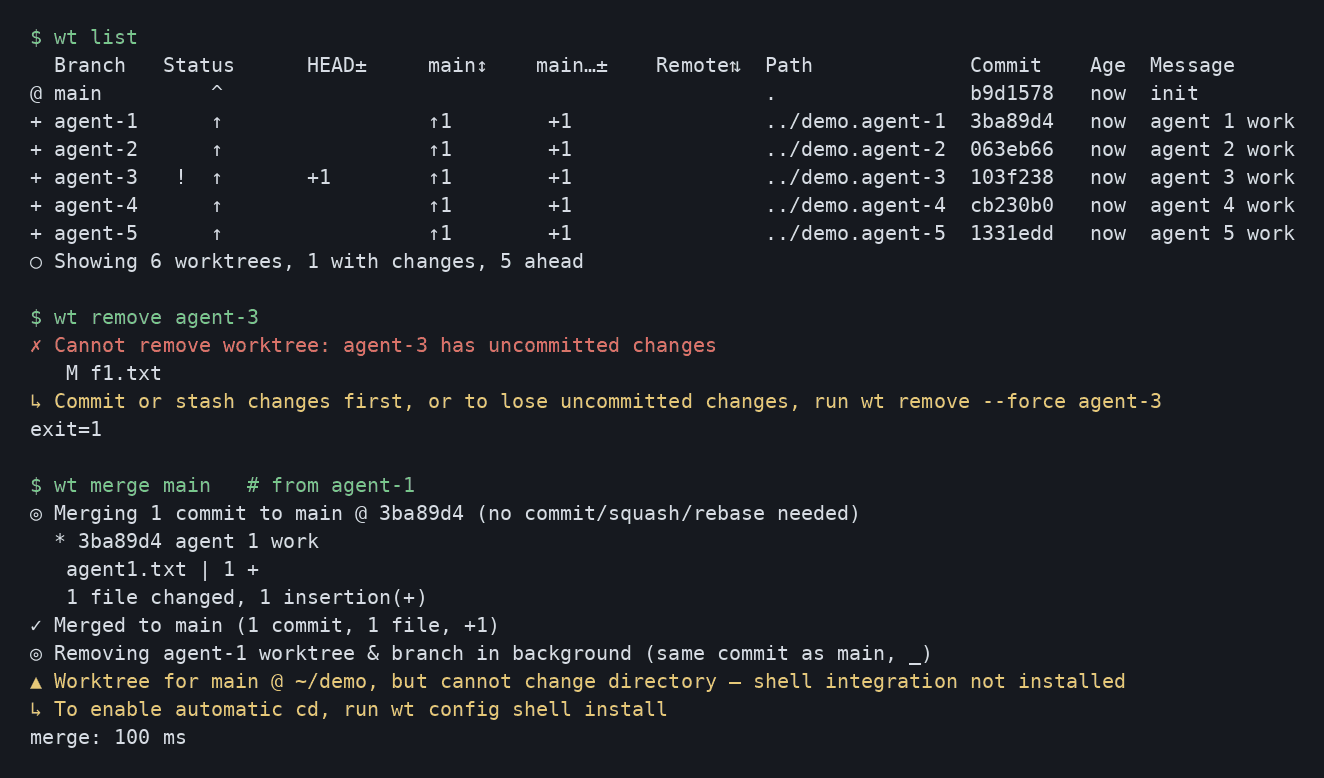
The payoff is wt list. One command printed every worktree with its branch, path, last commit and age. Each agent branch showed as one commit ahead of main, and agent-3 carried a ! for uncommitted changes. The footer summed it up: "Showing 6 worktrees, 1 with changes, 5 ahead". Plain git needs git status and git log in five folders for the same picture, and that summary is how I'd pick which agent to review first. The list docs explain each column. One small annoyance: the list redraws as it fills in, so a log file gets every redraw.
It wouldn't delete unfinished work
Cleanup is where raw worktrees lose work, because deleting the wrong folder takes an agent's uncommitted changes with it. I left an edit to f1.txt in agent-3 and ran wt remove agent-3. It refused with "Cannot remove worktree: agent-3 has uncommitted changes", listed the file, exited with code 1 and pointed to wt remove --force for anyone who really means it. The folder was still there afterwards. That's the default I want when a script or an agent does the cleanup.
Then I ran wt merge main from agent-1. The branch was one commit ahead, so Worktrunk said no commit, squash or rebase was needed and fast-forwarded main to that commit in 100 ms. It removed the worktree and branch in the background. Right afterwards git worktree list no longer showed agent-1, though an empty 4 KB folder was still on disk when sizes were checked a moment later. The merge docs cover the squash and rebase cases I didn't hit.
Does wt step copy-ignored save disk space?
Not on ext4. A new worktree gets tracked files only, which is how git works: each new one was 816 KB while the main checkout, with its node_modules, was 51 MB. Every agent would have to reinstall dependencies before running tests.
Worktrunk's fix is wt step copy-ignored, which copies gitignored files from the main worktree into the current one. I ran it in agent-4 and it reported "Copied 1 file · 47.7 MiB (full copy)" in 78 ms, leaving a 48 MB node_modules there. That "full copy" was my second surprise. The step docs say it uses copy-on-write clones on APFS, btrfs, XFS and ReFS, so many worktrees can share one build cache. An ext4 disk can't do that, so each copy costs real space. A Mac should do better, but I haven't tested one.
What's the catch?
The shell doesn't follow it. A program can't change the directory of the shell that started it. After the merge, Worktrunk said it couldn't change directory back to main because shell integration wasn't installed, and told me to run wt config shell install. Until you do, wt switch creates the worktree and leaves you where you were.
It doesn't stop conflicts. Separate worktrees keep agents from overwriting each other's files while they work. They don't stop two agents from changing the same function. That still shows up at merge time, and someone still has to resolve it.
What this means for product and GTM teams
With several coding agents running at once, the agents aren't the bottleneck. The person keeping track of five branches is. That's a harness problem, not a model problem, and Worktrunk is a small, boring piece of the harness. I mean that as praise.
It gives each agent its own folder, shows what each one changed in one list, and refuses to throw away unfinished work. If you're trying long-running loops like the Ralph loop or a multi-agent workspace like Kiro Crew, this is the layer underneath that keeps the output reviewable.
If I were starting today, I'd install shell integration, check wt list before reviewing any agent's work, and let the remove guard do its job.
Frequently asked questions
Is Worktrunk free?
Yes. It's open source under MIT or Apache-2.0, your choice, and the core commands need no account or API key.
How is Worktrunk different from git worktree?
It runs git worktrees underneath and adds branch-named paths, one status list across all of them, safe removal, merge with cleanup, hooks and copying of ignored files. In my run it was slower to create them, 195 ms for five against 84 ms.
Does Worktrunk work with Claude Code or Codex?
It works with any agent that runs in a folder, and its -x flag starts a command such as an agent CLI after switching. I tested the worktree commands, not a live agent.
Sources
- max-sixty/worktrunk on GitHub (README, stars and license checked 3 Nov 2026)
- Worktrunk releases (v0.81.0, 21 Oct 2026)
- Worktrunk documentation
- Worktrunk docs: wt list
- Worktrunk docs: wt merge
- Worktrunk docs: wt remove
- Worktrunk docs: wt step, including copy-ignored
- Worktrunk docs: LLM commit messages
- Git documentation: git worktree

Kartikay Dhar
Head of Product at Sprouts.ai, where he leads One Platform, Sprouts Data Universe and the Sprouts MCP. On Instagram he shares one free GitHub repo a day.
Related articles
ui-diff tested: visual QA that caught a contrast bug
I ran ui-diff on a two-page demo. It caught a 1.91:1 contrast drop, and Cursor's agent correctly explained a misleading focus-order note.
DeepSeek Super-agent is a router for coding work
DeepSeek Super-agent is a research prototype for a proactive GitHub coding agent on DeepSeek Harness. Here is what the open docs say it is, and is not.
agent-dream tested: AI memory that cites its sources
I ran agent-dream, a free MCP server that turns past coding chats into memory pages. Each fact cites its messages, and a fake citation was rejected.